
Your playlists, on every screen.
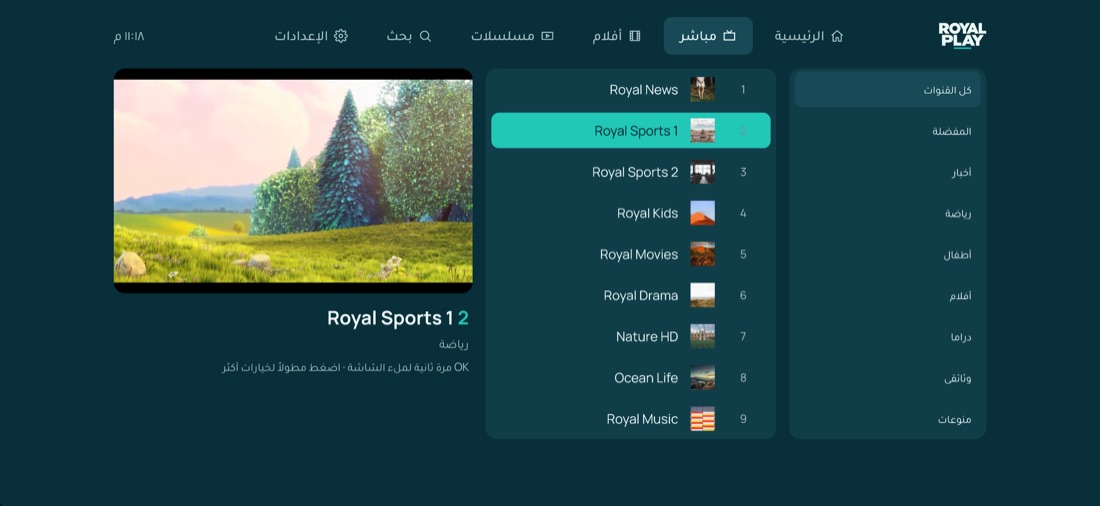
Royal Play is a fast, clean media player for M3U and Xtream Codes playlists. Add your list once from the website and watch on your TV, computer, phone or tablet.
Free trial on every new device

- platforms
- 9
- platforms
- playlists per device
- 5
- playlists per device
- day free trial
- 7
- day free trial
- interface languages
- 2
- interface languages
One app, every screen
See it in action
Up and running in three steps
Install the app
Download Royal Play on your Smart TV, computer, phone or tablet and open it.
Note your MAC & key
The app shows your device MAC address and a 6-digit device key.
Add your playlist
Enter them on this website, add your M3U link or Xtream login, then press “Reload playlists” in the app.
Built for watching, not fiddling
M3U & Xtream Codes
Live TV, movies and series, organised by category automatically.
TV guide (EPG)
See what is on now and next, straight from your provider.
Up to 5 playlists
Keep several lists on one device and switch between them.
Parental control
Lock or hide categories behind a 4-digit PIN.
Favourites & search
Find any channel, movie or series in seconds.
MAC lock
Lock your playlists so nobody can change them from the website.
Download Royal Play
Pick your device. Every new device gets a free trial, no account needed.
Direct download
Windows 10 and 11 (64-bit) · .exe installer, about 110 MB
Version 0.5.21
If Windows SmartScreen appears, choose “More info”, then “Run anyway”. The app updates itself.
Apple Silicon and Intel Macs · .dmg, about 230 MB
Download · .dmgVersion 0.5.21
First launch: if macOS says it can’t verify the app, open System Settings → Privacy & Security and click “Open Anyway”.
Phones, tablets and Android TV boxes · .apk
Download · .apkVersion 0.5.21
Allow “Install unknown apps” for your browser or file manager when asked.
Install the free “Downloader” app, then enter this code:
7988100
or the address royalplay.tv/firetv
The Fire TV store version is on its way.
App stores
Google Play
Phones, tablets and Android TV
In store reviewLG Smart TV
LG Content Store (webOS)
In store reviewSamsung Smart TV
Samsung Apps (Tizen)
In store reviewiPhone & iPad
App Store
In store reviewHisense VIDAA
VIDAA App Store
Coming soonFrequently asked questions
Does Royal Play include channels or movies?+
No. Royal Play is a player only. You add the M3U link or Xtream Codes login you got from your own provider.
How do I add my playlist?+
Open the app and note the MAC address and device key. Enter them on this website (Upload playlist), add your list, then press “Reload playlists” in the app. You can also add it straight from the app.
Which devices does it run on?+
Android phones and tablets, Android TV boxes, Amazon Fire TV, Windows, Mac, LG and Samsung Smart TVs and Hisense VIDAA. iPhone and iPad are coming to the App Store.
Is there a free trial?+
Yes, every new device gets 7 days free. After that the device is activated by your provider.
How do I install it on Fire TV?+
Install the free “Downloader” app from the Amazon store, open it and type the code 7988100.
Windows or Mac says the app can’t be verified+
Windows: choose “More info”, then “Run anyway”. Mac: open System Settings → Privacy & Security and click “Open Anyway”. You only do this once.
Will I lose my activation if I reinstall the app?+
No. The MAC address comes from the device itself, so the same device keeps its activation and playlists.

Ready to watch?
Install Royal Play, then add your playlist from this website in under a minute.